
A few weeks ago I was reading a recipe on my phone, and a grey sheet slid up from the bottom of the screen with a paragraph of text and two buttons. I did what I have done a thousand times: pressed the darker one to make it go away, without reading a word, and got on with the risotto.
Then it bothered me. I write software for a living, I know roughly what a cookie is, and I still had no idea what that tap had just agreed to or refused. So I picked a real site, opened the browser’s developer tools, and clicked the banner both ways while watching what the page actually did.
The short version:
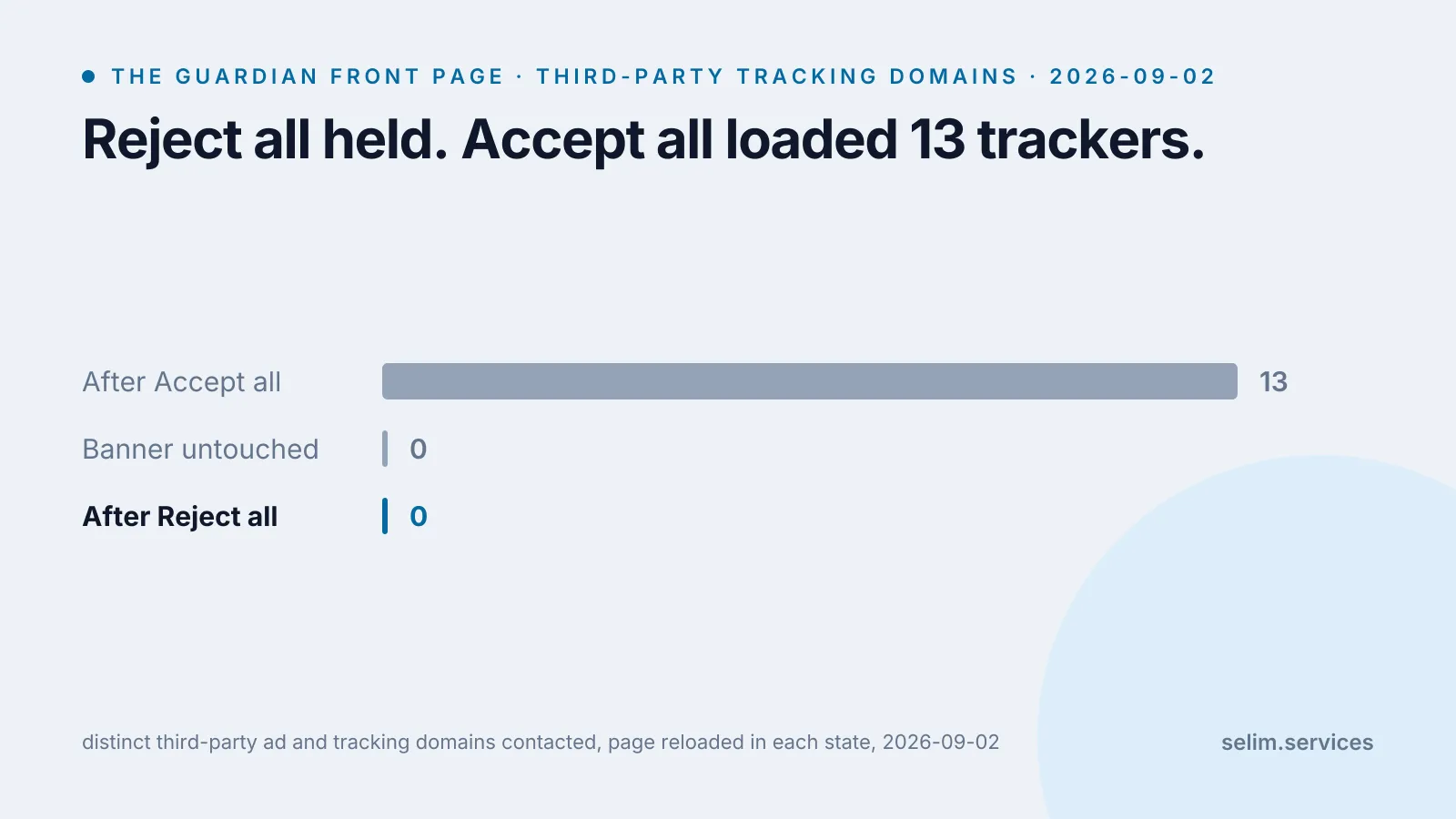
- On a banner that is built properly, “reject all” works. On the site I measured, choosing it meant not one advertising or tracking company was contacted. Accepting loaded thirteen.
- “Reject all” is not “no cookies”. A handful stay no matter what you pick, including a new one that records the fact that you said no.
- The banner only speaks for the companies the site signed up in advance. Anything outside that list, and anything the site does on its own servers, is not part of the deal you were offered.
- Whether the button is honest is not something you can tell by looking. Regulators have spent five years fining companies over exactly this, and researchers who scanned thousands of these banners found plenty that ignore the answer.
What you actually tapped
A cookie is a short piece of text a website asks your browser to keep and send back on the next request.[8] That is the whole mechanism. It is how a site remembers you are logged in, what is in your basket, and which language you picked. Used that way it is first-party and uncontroversial.
The version the banner is about is the other one. A page can also load a script, an image or a frame from a different company’s server, and that company can set a cookie of its own through it.[8] Now an advertising firm you have never heard of has a marker in your browser that it sees again on every other site carrying the same script. That is a third-party cookie, and stringing those sightings together into a profile is what “we value your privacy” is quietly asking about.
European law says a site needs your consent before storing or reading anything on your device, unless that storage is strictly necessary for something you asked for.[2] Consent has a definition: it has to be a freely given, specific, informed, unambiguous choice, made by a clear affirmative action.[1] A pre-ticked box does not count. Silence does not count. That legal sentence is the reason the banner exists and the reason it has a real button rather than just an “OK”.
Most large banners are wired to a shared system called the Transparency and Consent Framework, run by the advertising trade body IAB Europe.[3] When you choose, the CMP (the “consent management platform”, the company whose banner it is) writes your decision into a compact code called a TC string and hands it to every ad and analytics vendor on the page through a browser API they all agree to read. One choice, broadcast to a list.
I measured it on a real site
I used the Guardian’s international front page, because its banner is one of the better ones: an “It’s your choice” panel that says it works with 139 partners, with “Yes, I accept” and “No, thank you” sitting side by side at the same size.
Everything below was measured on 2 September 2026 from my own laptop. You can read your own consent state straight from the console with the framework’s API.
__tcfapi('getTCData', 2, (data, ok) => ok && console.log({
  purposesAllowed: Object.entries(data.purpose.consents).filter(([, v]) => v).length,
  vendorsAllowed: Object.values(data.vendor.consents).filter(Boolean).length,
  tcStringLength: data.tcString.length,
}));I loaded the page in three states, reloading fully after each choice so that any vendor scripts had their chance to run, and counted the distinct third-party ad and tracking domains the page contacted.
| state | tracking domains contacted | TCF purposes allowed | vendors allowed | TC string |
|---|---|---|---|---|
| banner shown, not answered | 0 | none | none | not written yet |
| after “No, thank you” | 0 | 0 of 11 | 0 of ~1,360 | 290 characters |
| after “Yes, I accept” | 13 | 11 of 11 | 105 of ~1,360 | 858 characters |
The banner held everything back until I chose, which is how it is meant to work. After I accepted, the page pulled in thirteen third-party domains: Google’s ad server, Amazon’s, Comscore, a viewability measurement firm, a data company, an ad-fraud checker. After I rejected, none of them. On this site, “reject all” does what it says.
The TC string is the tell. Rejecting produced a 290-character code that is almost entirely the letter A, which is base64 for zero: every purpose off, every vendor off. Accepting produced an 858-character code carrying 105 switched-on vendors and all eleven data-use purposes. That string is what gets passed around. It is the actual product of the click.
“Reject all” is not “no cookies”
Reloading after “No, thank you”, the site still had a small set of first-party cookies: a country code from geolocating my IP, an identifier bucketing me into an A/B test of the site’s own layout, and two that were not there before I answered, named consentDate and consentUUID. Rejecting had added cookies: the record that I rejected, so the banner does not ask me again tomorrow.
This is allowed, and it is not a trick. The law’s carve-out is for storage that is strictly necessary for a service the user asked for,[2] and remembering your consent choice, keeping you logged in, holding your basket and balancing server load all sit inside that line. “Reject all” means reject the optional tracking. It has never meant a browser that stores nothing. If you want that, the control is in the browser itself, not the banner: clearing site data, or a setting that blocks third-party cookies outright. An incognito window does some of this for you, and less of it than most people assume.
The parts the banner does not cover
The bigger gap is scope. The consent string only binds the vendors the site enrolled in the framework ahead of time, and a few things routinely sit outside it.
A script dropped straight into the page, rather than loaded through the framework, does not have to wait for the TC string and is not counted in that “139 partners” number. A careful site holds those back too, and not every site is careful.
Then there is “legitimate interest”. The framework used to let a vendor process your data on the basis of its own legitimate interest rather than your consent, for some purposes, so rejecting consent did not fully switch it off. Version 2.2 of the framework, in May 2023, removed that option for the personalised-advertising and personalised-content purposes, and consent is now the only basis for those.[3] An older or un-updated banner can still lean on it for analytics.
And the banner only governs what happens in your browser. What the site does with your request after it arrives, in its own logs and on its own servers, is a separate question the banner does not speak to and mostly does not raise.
Why the button looks the way it does now
The reason “No, thank you” sits right next to “Yes, I accept”, the same size, is that for years it did not.
On the last day of 2021, the French regulator fined Google a total of 150 million euros and Facebook 60 million, on the same grounds: the sites had a button to accept every cookie in one click, and no equally simple way to refuse. It took several clicks to say no. The regulator ordered both to fix it within three months.[4] The design you see today, two equal buttons on the first screen, is the shape those decisions forced.
It is not a settled fight. In September 2025 the same regulator fined Google 325 million euros and the retailer Shein 150 million over cookies placed without consent, and repeated that the choices a site offers “must be presented in a balanced manner, without encouraging” one over the other.[5] And a study that crawled thousands of these framework banners found a consent signal registered before the user chose anything on a meaningful share of them, a positive consent stored even after the user refused on others, and some sites with no reject control at all.[6] A banner that looks compliant and a banner that behaves compliantly are different claims, and only one of them is visible from the outside.
Where this leaves third-party cookies
For a while the expectation was that this whole apparatus had an expiry date, because Google had said Chrome would remove third-party cookies, catching up with Safari, which blocks them by default,[9] and Firefox, which locks each one inside the site that set it.[10] Chrome is no longer planning to. In October 2025 Google confirmed Chrome will keep its current approach of offering a cookie choice rather than removing the cookies, and is retiring the replacement advertising technologies it had been building.[7] The banner is not a transitional inconvenience. On the browser most people use, it is the mechanism for the foreseeable future.
Where my numbers are soft
One site, one laptop, one afternoon. The Guardian is a good-faith implementer and I picked it partly for that, so “reject all worked here” is a fact about a well-run banner, not a claim about all of them. The study above is the counterweight.
The connection I measured from is not in the European Union, and the banner a site shows can depend on where it thinks you are. On the same run, a hotel-booking site set a cookie that described me as regulation=none and marketing=true without my having touched anything, which is a decision it would be riskier to make for a visitor it believed was in the EU or the UK. If you are inside that area you may see a stricter banner, or an unavoidable one, or a different default than I did.
And document.cookie in the console only shows first-party cookies that are not marked HTTP-only, so the small counts in that table are the visible layer, not the whole jar. The meaningful difference between rejecting and accepting was never in that number anyway. It was in the 105 vendors and the network requests they generate, which is where I was looking.
I should also say that this site is not innocent here. selim.services sets three cookies, two of them Google Analytics, and shows you no banner at all, on the argument that the traffic is tiny and the analytics are configured to not be used for advertising. That argument is a judgement call I made, not a law of nature, and a stricter reading of the same rules I quoted above would say the analytics cookies should be behind a consent gate too. Naming that feels more honest than pretending the measurement was done from higher ground.
How to check any banner in two minutes
Nothing here needs you to be a developer.
- Before you answer, open developer tools and look at Application, then Cookies. That is the set the site considers necessary. If it is already long, that is the “strictly necessary” category being read generously.
- Paste the console snippet above after you choose.
vendorsAllowed: 0after a reject is the banner behaving. A non-zero number after a reject is not. - Reload, open the Network tab, and sort by domain. Count the domains that are not the site you are on. Do it once after rejecting and once after accepting. The difference between those two counts is what the button bought you.
- If there is no one-click reject on the first screen, that is the finding. Five years of fines say a refuse option should be as reachable as the accept option. A banner that buries it is telling you something about how it treats the rest of the choice.
The same measurement turns up in why websites feel slow: most of what a page loads is third parties nobody at the company can name. What a browser extension can see is the sharper version of it, code with far more reach than any cookie, on the same machine, behind a prompt that is just as easy to wave away. All three work because the tap that matters and the tap that does not look exactly alike, which is also why a stranger can decide about your site in thirty seconds without reading it. The banner is built for the person who is not reading. Read it once and you can usually stop.