
People open an incognito window for all kinds of reasons: looking up a symptom, checking flight prices, googling a gift on a shared laptop, signing in to a second account. The name suggests you go in disguised. I wanted to know exactly how much of a disguise it is. So I pointed the same Chrome at the same test site twice, once in a normal window and once in incognito, and compared what the site received.
The short version:
- Incognito hides what you did from whoever uses this computer next. That is what it was built for, and in my test it did that job.
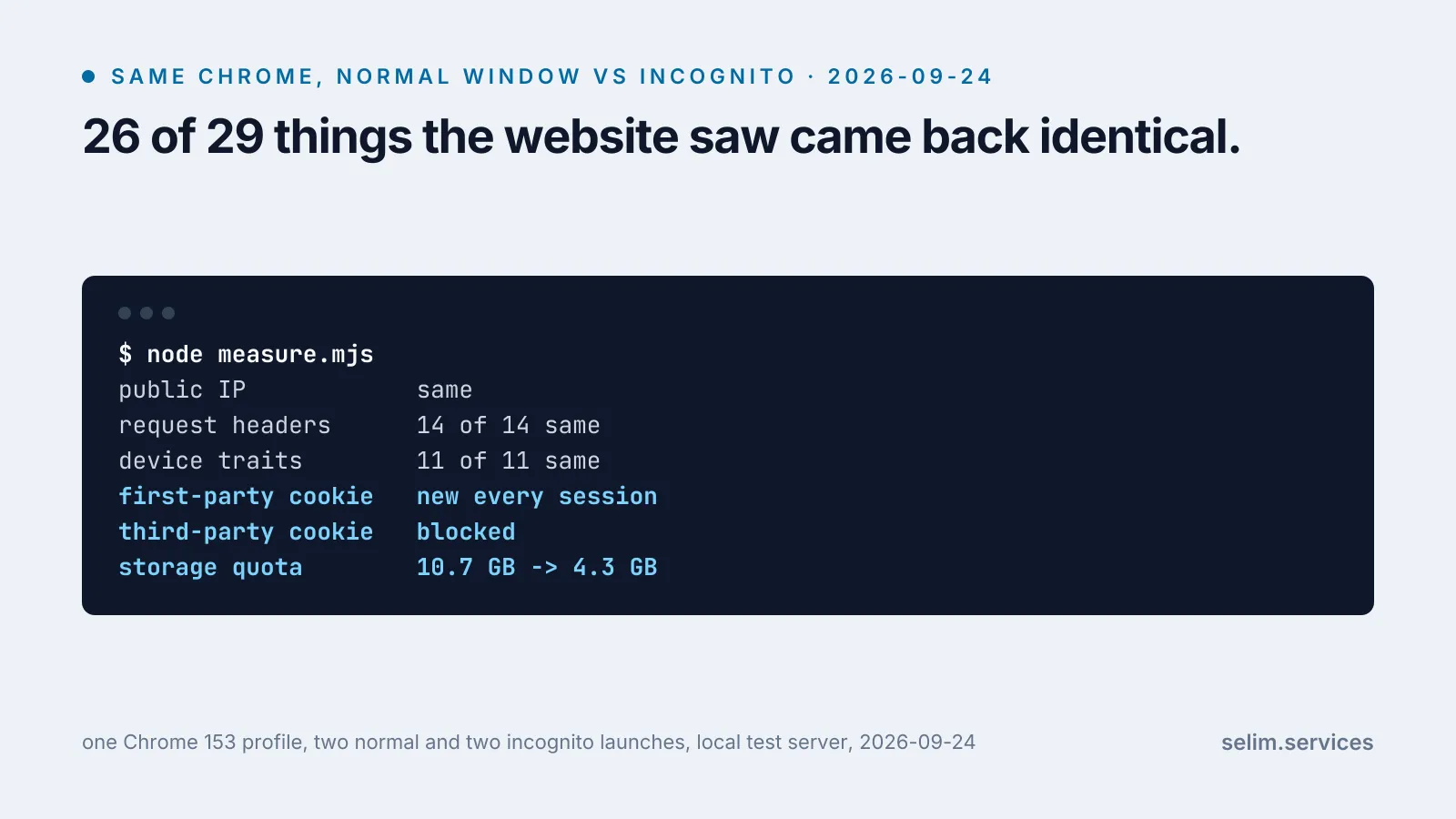
- It does not hide you from the website you visit, or from the network you are on. Google’s own help page says so.[1] In my test the site saw the same internet address, the same 14 request headers and the same 11 device traits in both windows.
- Three things changed: cookies started empty and were thrown away at the end, cookies from embedded third parties were blocked, and the storage space the site was allowed dropped from 10.7 GB to 4.3 GB. That last one is visible to the site, so it can tell you are in incognito.
- Google settled a class action over exactly this gap in 2024. It changed its wording and agreed to delete or clean up billions of records.[2]
What incognito is actually for
Incognito is a privacy feature for this device, not for the internet. In Google’s words: “After your Incognito session ends, Chrome doesn’t retain site data or a record of the sites you visited.”[1] No history entry, no saved cookies, no autofill of what you typed, nothing left for the next person to open the laptop and find.
That is a real protection against a real person: someone else in your house, a colleague at a shared desk, you in a year scrolling through your history. It is just a different person from the one most people picture when they open it.
What the site saw, in both windows
My setup was simple. A small server on my laptop played the part of “a website”. It logged every request, left a cookie, ran the kind of script ad and analytics code runs to describe your device, and embedded a second address to stand in for a third party, like an ad or a social button. A script drove my ordinary installed Chrome 153 through four visits using one profile: normal, normal again, incognito, incognito again. It also asked a public service for my internet address in each window, compared the results and kept none of them.
| what the site can read | normal vs incognito |
|---|---|
| public internet address (IP) | same |
| request headers (browser version, language, accepted formats and 11 more) | 14 of 14 same |
| device traits: browser and OS details, languages, timezone, screen size, CPU cores, memory, platform, graphics chip, a canvas drawing test, installed fonts (21 of the 30 I probed) | 11 of 11 same |
| first-party cookie | new every session |
| third-party cookie | blocked in incognito |
| storage quota | 10.7 GB vs 4.3 GB |
The device traits need a word of explanation, because they matter most. None of them is secret on its own. Plenty of people have your screen size or your graphics chip. But put eleven of them together and the combination starts to point at one machine. That combination is called a browser fingerprint, and the W3C defines it as the ability of a site “to identify or re-identify a visiting user, user agent, or device via configuration settings or other observable characteristics.”[3] The same document says two things that explain the whole table: “a browser fingerprint typically cannot be cleared or re-set,” and “tools such as clearing cookies or using a VPN do not prevent further correlation.”[3]
Incognito does not touch any of it. It is the same browser on the same hardware, so the fingerprint comes out the same. The canvas test, where a script draws a line of text and hashes the pixels, gave a byte-for-byte identical result in both windows.
The internet address is the same for a more basic reason. It belongs to your network, not your browser. Incognito does not change how your laptop connects to the internet, so the site, and your internet provider, and your office network, see the same address they always see. Google lists “your school, employer, or internet service provider” among those who may still observe you in incognito.[1]
The three things that did change
Cookies start empty and are thrown away. In the normal window, the site set a cookie on the first visit and got it back on the second, so it knew I was a returning visitor. In incognito, it set one on the first visit, and on the second visit, after I had closed and reopened the window, there was nothing. I was a stranger again. Inside one incognito session the cookie did work: when I reloaded, it came back. That is why you can still log in and fill a basket in incognito. The site remembers you for as long as the window stays open.
Third-party cookies are blocked. The embedded “third party” got its cookie back in the normal window and did not in incognito. Chrome says third-party cookies “are blocked by default” in Incognito.[1] In a normal Chrome window they are still allowed, because Google decided not to remove them after all.[8] Safari has blocked them in ordinary windows since 2020,[6] and Firefox gives every site its own separate cookie jar by default.[7] So the one real tracking protection incognito adds in Chrome is something two other browsers already do without it.
Less storage, and that gives you away. Every site gets a storage allowance on your disk, and any site can ask how big it is. In the normal window my test site was told 10.7 GB. In incognito it was told 4.3 GB. MDN notes that private modes “may apply different quotas”.[4] Chrome’s own developer page still puts the incognito figure at “around 100 megabytes”, which is not what Chrome 153 did on my machine.[5] The page is out of date on the number. The difference is still there, and a site can read it. You can check your own in ten seconds. Paste this into the developer console (F12, then Console) in a normal window and then in an incognito one:
(await navigator.storage.estimate()).quota / 1e9Your numbers will not match mine, because they depend on your disk. The gap between the two windows is the part that matters.
Google settled a lawsuit over this gap
Nobody has to guess whether “the site can tell you are in incognito” matters in practice. In Brown v. Google, a class action filed in June 2020, users argued that Google’s descriptions of incognito were misleading, because Google’s services on other people’s websites went on collecting data while they browsed privately. The settlement Google signed, filed in April 2024, reads like a list of the things in my table:[2]
- The incognito start screen had to “make clear that Incognito mode won’t change how data is collected by websites you visit and the services they use, including Google.”
- Google agreed to delete or clean up stored private browsing data. Its own estimate was “billions of event records”.
- It agreed to remove four internal “detection bits” it used to infer that a visitor was in incognito, and said it had looked and found no others.
- It agreed to keep blocking third-party cookies in incognito for five years.
What it did not include was money for the class. The agreement settled only the non-monetary claims and left people free to sue for damages on their own.[2]
Where my test is thin
It is one laptop, one browser, one morning. I compared what a site can read, not what any real site does with it. I did not test whether a real ad network actually links an incognito visit back to a normal one. The W3C note says the fingerprint makes that possible. It does not say every site does it.
My eleven traits are also a short list. They are what a page can read without asking for any permission, and real fingerprinting scripts read more. In a later test I counted 33 things a page read on a first visit, all without a prompt. So “11 of 11 same” is a floor. I also only tested Chrome. Safari’s and Firefox’s private windows may behave differently, and I have not measured them.
What incognito is actually good for
Used for what it does, incognito is a useful tool:
- A shared or borrowed computer. This is its real job, and it does it.
- A second account side by side. Signed in to your personal account in one window and a work one in the other, with no crossover while both are open.
- Seeing your own website as a stranger does. No saved login, no cached pages, no cookies from your last visit. If you run a site, this is the fastest honest look you will get at what a first-time visitor sees in the first thirty seconds.
It will not stop a website from recognising you. For that, the tools work on different layers. Your network address is changed by a different network. What sites track is controlled by the site’s own consent banner, which, when a site builds it properly, does hold. And a browser that blocks third-party cookies in every window, not only the private one, handles the embedded trackers.