
I installed a screenshot extension last month. Chrome put up a grey box telling me it wanted to read and change all my data on the websites I visit, I thought “well, yes, it takes screenshots”, and I clicked Add. That was the entire security review, and it took under a second.
I write browser extensions for a living. Three of the ones in my browser are extensions I built myself: TheTab, Save Image As Type and the ZeroUtil image converter. So I know exactly what that sentence grants the developer, because I have been the developer it granted it to. What I had never done is turn the question on my own machine and count.
The short version:
- 12 of the 20 extensions I chose to install can read and change every page I open. Most of them genuinely need it. That is a different statement from “it is fine”.
- The single sentence Chrome shows you covers six separate capabilities, and one of them is your logged-in session cookies for those sites.
- The list of permissions you are shown is not the list the developer wrote. Several of the most sensitive keys show you nothing at all.
- Chrome lets you turn any extension down to “only when I click it”, per extension, without uninstalling it. I had done this for exactly zero of mine.
What is in your own browser, and how to count it
Every extension ships a file called manifest.json that states, in plain text, everything it is allowed to do. Chrome keeps an unpacked copy of that file on disk for every extension you have installed, so you can read all of them without installing anything or trusting anyone.
The two fields that decide how far an extension can reach are host_permissions, the list of sites it wants access to, and the matches patterns under content_scripts, which is the list of sites it wants to run its own code inside. Either one can say <all_urls>, and either one means the same thing in practice. Counting only the first is the mistake I made when I started: Google Translate declares no host_permissions at all and still runs on every page, because it asks through the second field.
import glob, json, os

ALL = {"<all_urls>", "*://*/*", "http://*/*", "https://*/*"}
BASE = os.path.expanduser("~/Library/Application Support/Google/Chrome/Default/Extensions")

def name(folder, m):
    n = m.get("name", "?")
    if not n.startswith("__MSG_"):
        return n
    f = f"{folder}/_locales/{m.get('default_locale', 'en')}/messages.json"
    msgs = json.load(open(f, encoding="utf-8")) if os.path.exists(f) else {}
    key = n[6:-2].lower()
    return next((v["message"] for k, v in msgs.items() if k.lower() == key), n)

for path in sorted(glob.glob(f"{BASE}/*/*/manifest.json")):
    m = json.load(open(path, encoding="utf-8"))
    perms = [p for p in m.get("permissions", []) if isinstance(p, str)]
    hosts = set(m.get("host_permissions") or [])
    hosts |= {p for p in perms if "://" in p or p == "<all_urls>"}
    hosts |= {p for c in m.get("content_scripts", []) for p in c.get("matches", [])}
    reach = "ALL SITES" if ALL & hosts else f"{len(hosts)} sites" if hosts else "no page access"
print(f"{reach:>14} {len(perms) - len(hosts & set(perms)):>2} perms {name(os.path.dirname(path), m)[:40]}")The _locales detour is there because an extension’s real name often lives in a translation file rather than in the manifest, and without it half the rows come back reading __MSG_extensionName__. On Windows the folder is under %LOCALAPPDATA%\Google\Chrome\User Data\Default\Extensions, on Linux under ~/.config/google-chrome/Default/Extensions.
     ALL SITES   5 perms  Google Translate
     ALL SITES   4 perms  Impeccable
     ALL SITES   7 perms  Save Image As Type - WebP to JPG, PNG, P
no page access   4 perms  VisBug
     ALL SITES  10 perms  Adblock Plus - free ad blocker
     ALL SITES   3 perms  Pixel Perfect Advanced
     ALL SITES   4 perms  PerfectPixel by WellDoneCode (pixel perf
     ALL SITES   4 perms  Dark Reader
     ALL SITES  16 perms  Claude
no page access   4 perms  GoFullPage - Full Page Screen Capture
no page access   6 perms  Save Image As - PNG, JPG, WebP, AVIF Con
       2 sites   4 perms  Google Docs Offline
no page access  13 perms  TheTab - OneTab Alternative | Tab Manage
     ALL SITES   4 perms  Wappalyzer - Technology profiler
     ALL SITES  17 perms  ChatGPT
no page access   1 perms  Screen Recorder
       6 sites   1 perms  daily.dev | Where developers discover wh
       2 sites   2 perms  Unhook - Remove YouTube Recommended & Sh
     ALL SITES   3 perms  Video Popout
     ALL SITES  12 perms  Awesome Screen Recorder & Screenshot
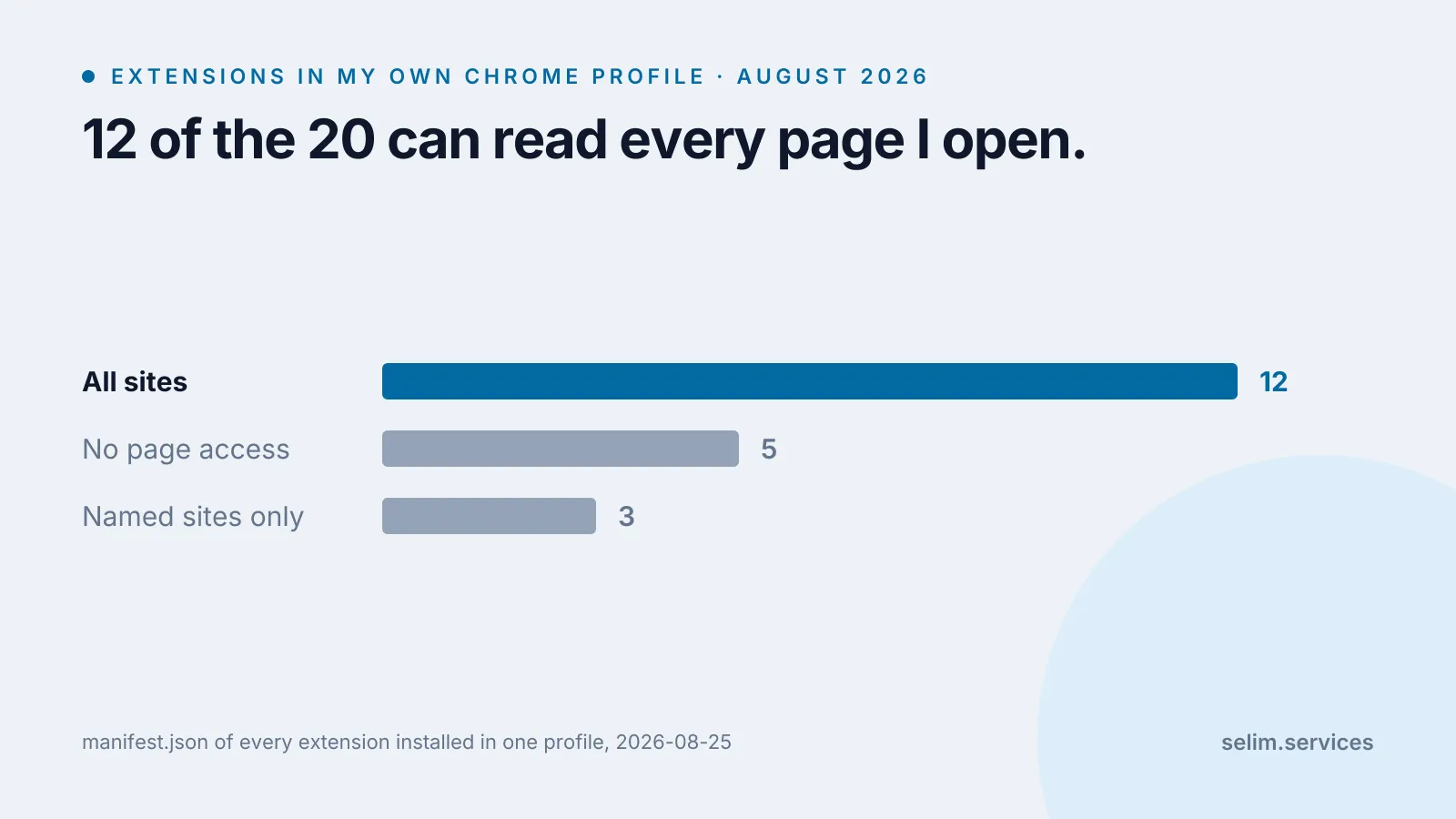
4 sites 2 perms Chrome Web Store PaymentsTwenty-one rows, of which the last is Chrome Web Store Payments, a component extension Chrome ships with itself rather than anything I installed. Of the 20 that are actually mine to have chosen: 12 can reach every site, 3 are limited to a handful of named ones, and 5 declare no page access at all.
This is one profile belonging to one person who tests browser extensions for a living, so treat it as a worked example rather than a statistic about anybody else. That is also the point of printing the script: the interesting number is the one from your own machine.
What “read and change all your data” actually grants
A host permission is not one capability, it is six. Chrome’s own documentation lists them, and they are worth reading slowly because only the first is the one most people picture.[1]
- Make network requests as if from that site. The extension can call the site’s own endpoints from its background code, carrying whatever your browser would carry.
- Read the URL, title and favicon of your tabs. These are the fields Chrome calls sensitive, and a host permission is one of the two ways to reach them.
- Inject its own code into the page. Not only at install time through the manifest, but at any moment, into any page that matches.
- Watch and control the network requests the page makes. Every URL the page fetches, in order, as it happens.
- Read your cookies for those sites. Including the session cookie that is the reason the site knows who you are.
- Redirect requests and rewrite request and response headers.
The fifth one is the one I would put on the install screen if I designed it. A cookie is not data about you in the abstract; for most sites it is the thing that proves you are you. An extension holding <all_urls> and the cookies permission can read the cookie that keeps you signed in to your email.
What it sees once it is on the page
A content script is a piece of the extension’s code that the browser runs inside the page you are looking at. It runs in what Chrome calls an isolated world, meaning it has its own JavaScript environment: the page cannot see the extension’s variables, and the extension cannot see the page’s.[5]
What both of them do share is the document itself. The extension reads and writes the page through the same standard DOM the page uses, which means everything rendered on screen is available to it, and so is everything in the page that is not rendered: hidden fields, values you typed into a form and have not submitted, the contents of a message you are half way through writing. There is no separate permission for “the sensitive parts of the page”. Access to the page is access to the page.
The isolation cuts the other way too, and this is the part that protects you. A page cannot reach into an extension, and one extension’s content script cannot read another’s. The wall is between the extension and the page’s own code, not between the extension and what you are doing.
The permission list you are shown is not the one the developer wrote
What Chrome puts in front of a user is a list of warnings, and the mapping from the manifest to those warnings is neither one-to-one nor intuitive. From Chrome’s own table of every permission and the warning it produces:[3]
| what the developer writes | what you are told |
|---|---|
tabs |
Read your browsing history. |
favicon |
Read the icons of the websites you visit. |
clipboardWrite |
Modify data you copy and paste. |
bookmarks |
Read and change your bookmarks. |
cookies |
nothing |
storage |
nothing |
contextMenus |
nothing |
activeTab |
nothing |
Two things fall out of that table, and a third out of the page it sits on. The first is that tabs, which sounds like the mildest thing an extension could ask for, is presented as reading your browsing history, and that framing is the honest one: the title and URL of every tab you open, as you open them, is your browsing history arriving live.
The second is that cookies shows you nothing. That is not an oversight. The cookies permission on its own can do nothing at all, because it only works for sites the extension already has host access to, so Chrome counts the warning as already covered by the host permission. Correct, and still worth knowing that the word never appears.
There is a third effect that goes further: warnings are suppressed when a broader one is already present. Chrome documents that the tabs warning is not shown if the extension also requests all URLs.[2] An extension asking for everything therefore shows you a shorter list than one asking for two specific things.
activeTab runs the other way: it grants real access to the current tab and shows no warning, and it is the careful choice rather than the sneaky one. It only switches on when you invoke the extension yourself, by clicking its icon or its context-menu item or pressing its keyboard shortcut, and it is revoked as soon as you navigate away or close the tab.[4] An extension that can do its job with activeTab and asks for <all_urls> instead has made a choice.
Three I built myself, and why they disagree with each other
Since I have been asking what other people’s extensions request, here is the same question turned on mine. All three are extensions I built, and all three are in the output above.
| extension | asks for at install | what it can reach |
|---|---|---|
| TheTab | 13 permissions, no host access | every tab’s title and URL, and not one word of any page |
| Save Image As Type | 7 permissions, <all_urls>, content script on every page |
everything |
| Save Image As (ZeroUtil) | 6 permissions, host access declared optional | nothing at all until the first time you use it |
TheTab is the case that shows the warning list is a poor proxy for reach. It is the extension in that table that can see the least - it never touches page content, and it has no host_permissions key at all - and it is also the one whose install screen looks the most alarming, because tabs reads as browsing history and bookmarks reads as your bookmarks. Both warnings are accurate. It is a tab manager. Managing tabs means knowing what they are.
The uncomfortable rows are the last two, because they are the same product built twice. Both convert an image you right-clicked into another format. Save Image As Type asks for <all_urls> at install and runs a content script on every page you open. The ZeroUtil one asks for no host access at install at all: it declares the same breadth under optional_host_permissions, which Chrome grants at runtime rather than at install,[1] and asks for it the first time you actually use the context-menu item.
I want to be precise about what that second shape buys, because it is less than it sounds. It is the same *://*/* in the end. What changes is that the grant is attached to a moment you chose, on an extension you had already decided to keep, rather than to the install screen you clicked through in a second - and that if you never use it, it never holds anything. Deferring a grant is not the same as narrowing it.
Nothing about the job requires the first shape either way. The older extension was written that way because <all_urls> is the shape that always works and nobody argued with it; the newer one was not. The difference between them is a decision rather than a constraint, and I am the person who made both. If you are looking for the honest version of “how careful is this developer”, that pair is it.
What the browser will not let it do
Some of the fears attached to extensions are out of date, and it is worth being specific about which.
Under Manifest V3, all of an extension’s logic has to ship inside the extension package. Loading and running code fetched from a server at runtime is not allowed by Chrome Web Store policy, and that covers a library on a CDN as much as a script from the developer’s own host.[8] The practical effect is that the code running in your browser is the code that was submitted for review, rather than whatever the developer’s server decides to send today. That is a real improvement and it is the main thing Manifest V3 bought. I have written about what the same change did to the developer’s side of the line, which is mostly a story of things getting harder.
Firefox draws the line in a different place. MDN’s own documentation says most browsers treat host_permissions as optional, and Firefox lets you grant or revoke a site at a time.[7] Worth knowing that this took a while to become visible: until Firefox 127, a Manifest V3 extension’s requested host permissions were not shown in the install prompt at all.
The part nobody re-asks you about
An extension updates itself in the background. If an update adds a permission that triggers a warning, Chrome disables the extension until you accept the new one.[2] That is a genuine consent checkpoint and it works.
What it does not cover is an update that stays inside the permissions you already granted. An extension holding <all_urls> has room to change what it does with every page you visit, and no checkpoint stands between the old version and the new one, because from Chrome’s point of view nothing about the request has changed.
I can point at the checkpoint working, because I tripped it deliberately. TheTab needed the bookmarks permission as a required one rather than an optional one, so that its bookmark mirror could be on by default and survive an uninstall. The note sitting in that manifest, dated 15 July 2026, says the extension will be disabled on update until existing users re-approve it, and that we were accepting that. Every user of it had to click a box because we added one word to a file.
That is the shape of the trade. A permission you were asked about is a permission someone had to justify. A permission you already granted is a permission nobody will mention again.
What I do now
Four things, in the order they take effort.
Read the reach, not the warnings. The question worth asking is which sites, not which capabilities. For an extension you already have, the Details page in Chrome’s extension manager names them under the site-access setting described below. For one you are about to install, the warning box is all you get, and the reach behind it is the thing to picture.
Turn the dial down. In Chrome, open Manage Extensions, click Details on an extension, and find the setting labelled “Allow this extension to read and change all your data on websites you visit”. It has three positions: on select, on specific sites, on all sites.[6] Setting a screenshot tool or an image converter to “on select” costs you one extra click when you use it and takes it out of every other page you open. It is a few seconds of work per extension, and it is the only item here that changes anything today.
Be suspicious of breadth without a reason. An extension that works on one site and asks for all of them is not necessarily hostile, but it has told you something about how it was built. Mine did.
Uninstall rather than disable. A disabled extension is one click and one forgotten decision away from being enabled again, and the grant it is holding does not expire.
Most of the twelve on my own list need what they asked for, and I would rather have them than not. What I would change is the shape of the deal: I agreed to all of it in one second, the agreement has no expiry, and the browser has quietly grown a dial that I had never once turned.
If you want the other half of the picture, the same browser is also handing every page you open to a stack of third parties nobody asked you about: why websites feel slow has the measurements for that side.