I have not solved a grid of traffic lights in months. Not on this site, not on the ones I use every day. I click a checkbox, or I click nothing at all, and I am through. I used to assume that meant the tool had gotten smarter about me specifically. It has not - it decided about me before I did anything, using things I never agreed to hand over.
So I picked a real CAPTCHA widget, opened developer tools, and watched what happened between the page loading and it deciding I was fine.
The short version:
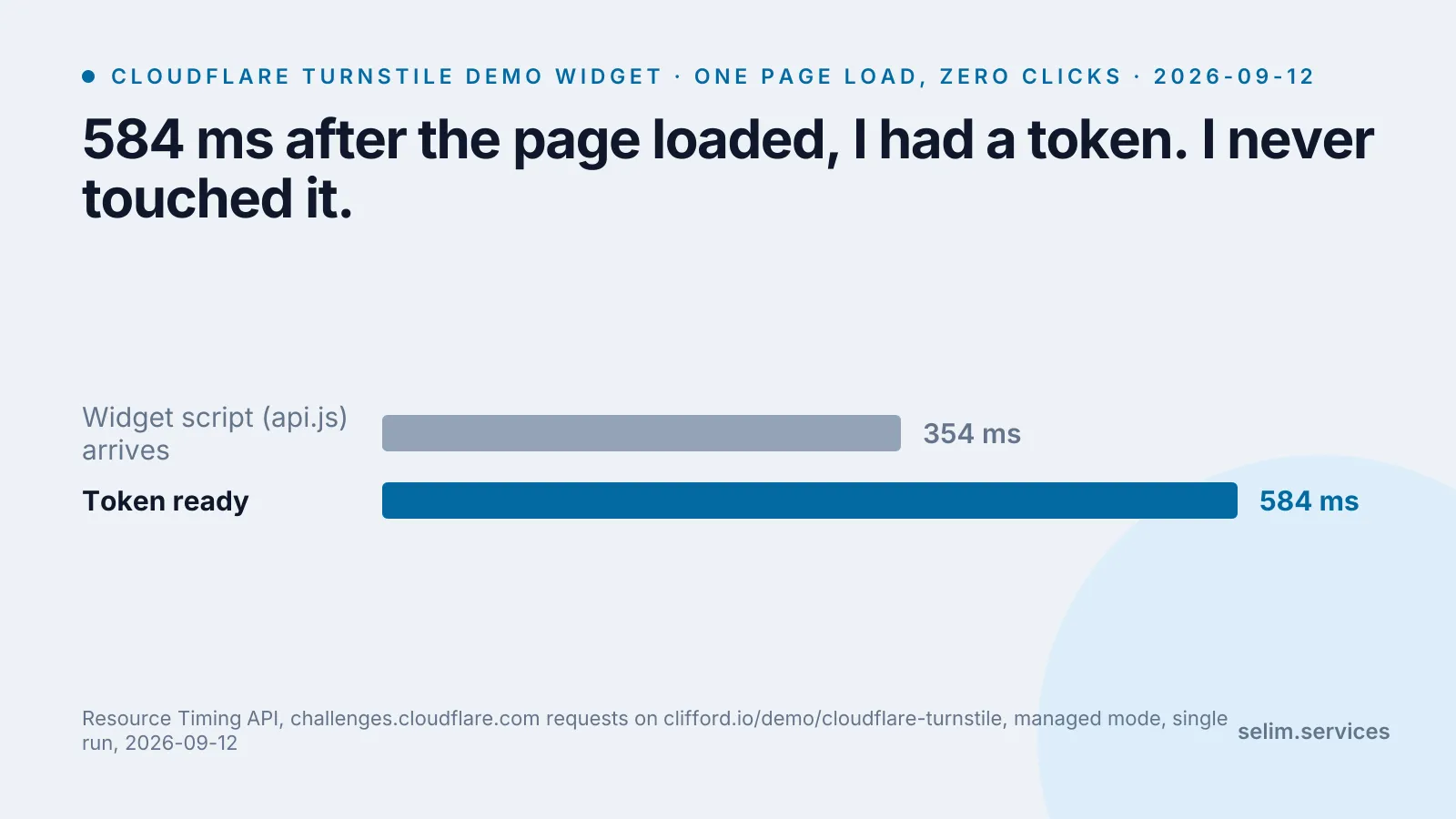
- On the one I measured, the decision was already made 584 milliseconds after the page loaded. I had not clicked, scrolled, or moved the mouse.
- What decided it is a JavaScript program running in my own browser, checking things about the browser itself - not a photo of me, not my typing rhythm.
- The company running the most common version of this does not publish the list of signals it checks. A less common one does, and it is a longer list than “are you a bot.”
- A newer design skips the test altogether for some visitors, using a cryptographic trick that lets a site trust “this visitor already proved themselves somewhere” without learning where.
The idea is older than the web decade you think it’s from
“CAPTCHA” is an acronym - Completely Automated Public Turing test to tell Computers and Humans Apart - from a 2003 paper by four researchers who set out a specific bar: a test has to be easy for a person and, by construction, at least as hard for a program as an open problem in artificial intelligence.[7] Reading distorted letters was that year’s hard AI problem. It stopped being one once software got good at reading distorted letters, which is the whole reason the letters gave way to traffic lights, and the traffic lights are giving way to nothing at all.
That last move is the interesting one. If the point was never the puzzle - the puzzle was just the cheapest available proxy for “a human is present” - then the obvious next step is finding a proxy that does not cost the human anything. That is what the checkbox and the invisible widget are.
What actually happens when the page loads
I used Cloudflare’s own public Turnstile demo, a managed-mode widget, and did nothing to the page after it loaded - no click, no scroll, no keypress.
document.querySelector('.cf-turnstile').outerHTML
// <div class="cf-turnstile" data-sitekey="0x4AAAAAAAGlwMzq_9z6S9Mh">
//   <div><div></div>
//   <input type="hidden" name="cf-turnstile-response"
//          id="cf-chl-widget-0s3gl_response"
// value="1.npmpZhiARM5DGURf_HSPLBEWA..." (752 characters)>No iframe, no checkbox, no spinner ever rendered. The Resource Timing API shows why: the widget’s script arrived 354 milliseconds after navigation started, made one more request to Cloudflare’s challenge platform, and had a finished, single-use token sitting in a hidden form field 584 milliseconds in.
| moment | time |
|---|---|
widget script (api.js) arrives |
354 ms |
| challenge request completes, token ready | 584 ms |
Cloudflare’s own documentation says what fills that half-second: “a series of small non-interactive JavaScript challenges to gather signals about the visitor or browser environment,” naming proof-of-work (a small computational puzzle), proof-of-space, probing for web APIs, and checks for browser quirks - and that this is what lets it “fine-tune the difficulty of the challenge to the specific request and avoid showing a visual or interactive puzzle.”[3] None of it looked at my face, my typing, or my mouse - all of it looked at whether the JavaScript engine that just ran behaves like a real browser’s.
That is the whole trick behind “managed mode”: run cheap checks first, and only spend the user’s attention if those checks come back ambiguous.[4]
The checkbox works the same way, one layer up
The older, more familiar version is reCAPTCHA v2’s “I’m not a robot” checkbox. Google’s own documentation describes the same binary shape: clicking it “will either pass the user immediately (with No CAPTCHA) or challenge them to validate whether or not they are human.”[2] The click itself barely matters - it is the trigger, not the evidence.
On my own laptop, in my everyday Chrome profile, the checkbox turned green the instant I clicked it. No image grid. A study of reCAPTCHA v2 that followed over 3,600 users at a large public university for 13 months[9] points at the mechanism behind that. In the words of the researchers’ own university, it found that reCAPTCHA “extensively monitors users’ cookies, browsing history, and browser environment,” all of which “can be used for advertising and tracking purposes.”[8] A browser that is already logged into a Google account, with months of ordinary browsing history and no automation tooling in sight, looks nothing like a fresh headless script - and gets treated accordingly.
I have not measured the other end of that spread: what a genuinely fresh, cookie-less, automation-flagged browser sees on the same site. Everything above is one real profile, one set of default settings, one afternoon.
reCAPTCHA v3 pushes the same idea further and drops the checkbox entirely: it “never interrupts your users,” running silently on every action and handing the site a 0.0-to-1.0 score to act on however it wants.[1] What actually produces that number is not published. Google’s own docs stop at “based on interactions with your site.”[1] hCaptcha’s enterprise tier advertises a comparable score and “passive” checking mode, with the same gap: the signals behind it are not in the developer docs either.[5] Cloudflare is the outlier here, and the one exception is worth noticing - it names its categories in public documentation. The others keep the recipe, and disclose only the result.
The version where you never see anything at all
The newest design skips the running-checks step for some visitors entirely, using a genuinely different mechanism: a proof you carry with you rather than one generated fresh each time.
The IETF’s Privacy Pass architecture, published as RFC 9576 in June 2024, describes a two-step handshake. A client proves something once - solved a challenge, holds a valid subscription, whatever the issuer requires - and gets back a cryptographic token. That token can then be redeemed at a completely different site, which learns only that a trusted issuer vouched for this visitor, not which check they passed or when.[6] The issuer sees the proof; the site sees the token; neither sees both halves, so neither can build a profile by combining them. It is the same shape as showing a stamped wristband at a second venue instead of standing back in line - the stamp proves something happened without saying what.
A visitor who arrives with a token like that has no challenge to see. The site has not stopped checking. The check happened earlier, somewhere else, and unlike the JavaScript probing above it cannot be inspected by opening developer tools, because the token is built to carry no readable history with it. I have not measured how often this happens on real sites. The RFC describes how it is built, not how widely it is used.
Where this leaves the button you keep clicking
Nobody outside Google, Cloudflare and hCaptcha has the actual weighting behind any of these scores, and I am not going to pretend otherwise by naming signals I have not seen documented. What is public is narrower and still useful: Cloudflare tells you the categories it checks; Google and hCaptcha tell you a score exists; the RFC tells you how the no-challenge-at-all version is built to work. None of it is about whether you are a good person. All of it is about whether the browser in front of the test behaves like the millions of ordinary ones the vendor has already seen.
Two things worth doing next time a page pauses on one of these:
- Open developer tools before you click anything. The Application or Storage panel shows what the site already has on you - cookies, local storage - before the widget even runs. That is closer to the real input than anything on screen, and it is the part clearing your browsing data removes.
- Notice when there is no widget to click at all. An invisible pass is not the absence of a check. On the page I measured, the 230 milliseconds between the script arriving and the token being ready went to a request you would never have known to look for.
The parts of the web that watch what your browser is doing, quietly and without asking, keep turning out to be the same parts once you go looking - the permission tables sitting behind a browser extension and the consent string sitting behind a cookie banner are both, underneath the UI, this same shape: a decision made from signals you did not see requested, rendered back to you as a single small widget you barely register. The stranger checking your site in the first thirty seconds is doing something similar by hand - deciding without reading what your CAPTCHA decided in half a second.