
Before someone hands over a project, they usually ask a version of the same question. You use AI tools. Does that mean my code ends up on somebody’s server?
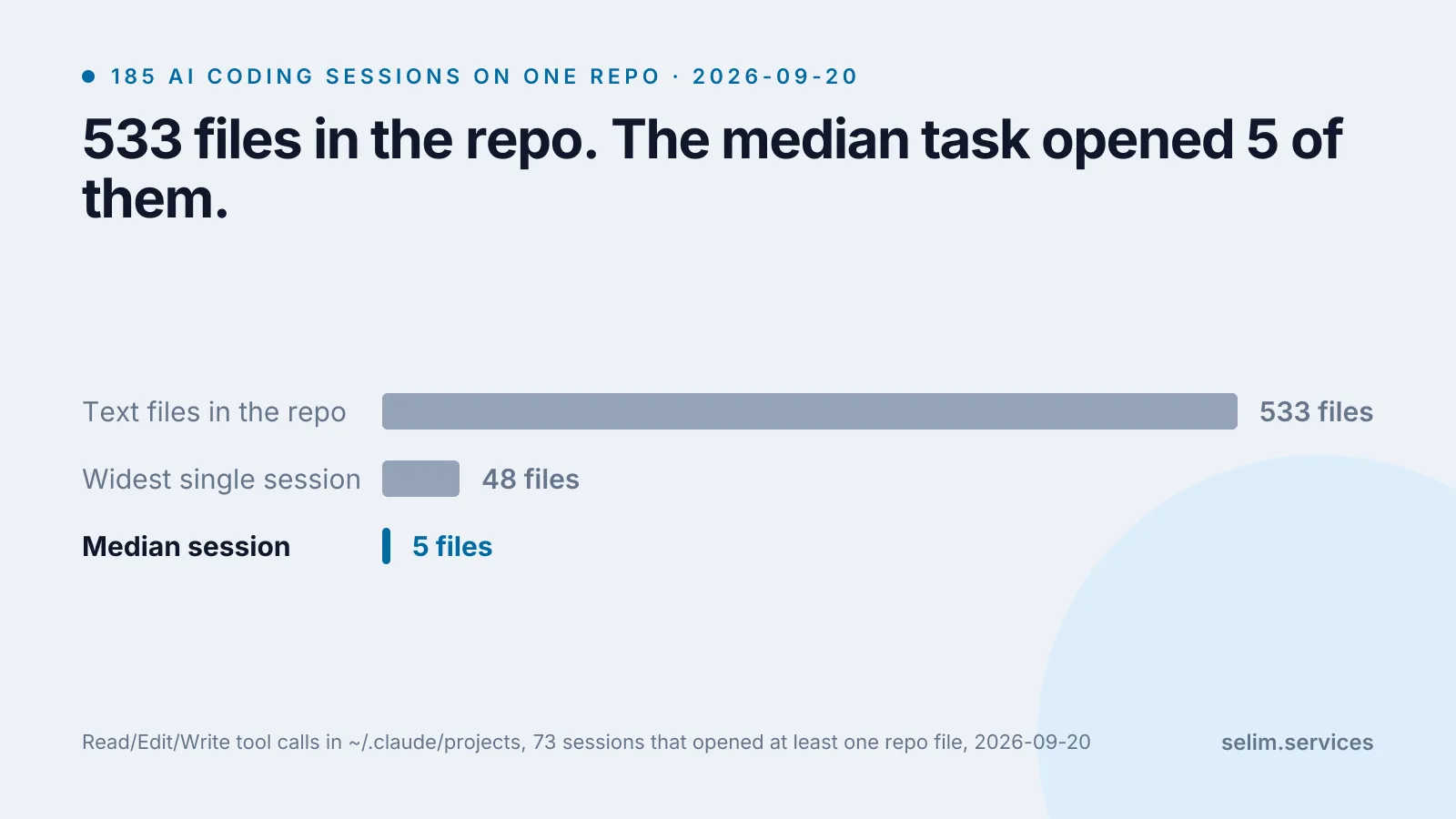
It is a fair question and it deserves a number rather than reassurance. So I counted. On this site’s own repository, across every AI coding session I have run on it, the typical session opened 5 files out of 533. The widest one opened 48. Nothing resembling “the whole codebase” was ever sent anywhere.
Then I looked at what those same sessions opened outside the repository, and that number was 482, which is the part of this I did not expect and the part worth your attention.
Where the numbers come from
Claude Code, the tool I use daily, keeps a transcript of every session on my own disk, in plaintext, under ~/.claude/projects/, for 30 days by default.[1] Every tool call it made is in there: which file it opened, which command it ran, what came back. That is an unusually honest audit log, because the tool wrote it for its own session-resume feature and not to answer this question.
This repository has 185 of those transcripts. I parsed all of them.
One thing to pin down before the numbers: what “opened” means. I counted a file as read when a tool call named it directly, through Read, Edit or Write. I did not try to resolve the files touched by shell commands, and those transcripts contain 5,288 shell calls of which 2,748 begin with something like cat, head or sed. So every number below is a floor, not a ceiling.
import json, glob, os, re, statistics

DIR  = os.path.expanduser("~/.claude/projects/<your-project-folder>")
REPO = re.compile(r"^/path/to/your/repo")
READ = {"Read", "Edit", "Write", "MultiEdit", "NotebookEdit"}

per_session, outside = [], set()
for path in glob.glob(os.path.join(DIR, "*.jsonl")):
    inside = set()
    for line in open(path, errors="replace"):
        try:
            msg = json.loads(line).get("message") or {}
        except ValueError:
            continue
        for block in msg.get("content") or []:
            if not isinstance(block, dict) or block.get("type") != "tool_use":
                continue
            if block.get("name") in READ:
                fp = (block.get("input") or {}).get("file_path", "")
                inside.add(fp) if REPO.match(fp) else outside.add(fp)
    if inside:
        per_session.append(len(inside))

print("sessions that opened a repo file :", len(per_session))
print("repo files per session           : median %g, max %d"
      % (statistics.median(per_session), max(per_session)))
print("distinct files opened elsewhere :", len(outside))sessions that opened a repo file : 73
repo files per session : median 5, max 48
distinct files opened elsewhere : 482Of the 185 sessions, 73 opened a file belonging to the repo at all. The rest were not coding work: they were research, admin, browser tasks that happened to be started from that folder. The median and the maximum are over those 73.
Why a coding agent reads so little
This is the mechanical part, and it is less mysterious than the marketing around it.
An agent works the way a contractor does on their first day. It is told what the task is, it goes looking for the two or three files that sound relevant, it reads those, and it stops. Nobody reads a codebase cover to cover before changing a config value, and neither does the tool. Its budget for a single request is finite and the repository is mostly irrelevant to any given task, so almost all of it never gets opened.
The most-opened files in my repo are exactly the ones you would guess: the two translation files, the data module behind the CV, the site config. They are the files that nearly every change touches.
This is also where I should say that “an AI coding tool” is not one thing, and the answer changes completely depending on which kind you mean.
An agent like the one I use reads on purpose, file by file, and each read is visible in a log. An autocomplete tool works the other way around. GitHub’s own documentation for Copilot code completion describes it plainly: the code around your cursor is pre-processed, combined with contextual information such as code snippets from open tabs in your editor, and sent to the model as a prompt.[3] That happens continuously, while you type, without anyone deciding that this particular file was relevant.
Neither is sinister. They are different shapes, and if you are the person asking the question, the shape is what you actually want to know.
The 482 files that were not in the repo
Here is the number I went looking for the code’s answer to and found something else instead. Grouped by where they live:
| where the file was | distinct files |
|---|---|
| scratch files the tool wrote itself | 201 |
| other project folders on the same disk | 164 |
| notes the tool keeps about how I work | 71 |
| elsewhere on the machine | 23 |
| its own config, skills and hooks | 21 |
| elsewhere in my home directory | 2 |
The first row is fine. Temporary files it created to do the work, then read back.
The second row is the one to look at. A session started in one project opened 164 files across four other project folders. Not because anything went wrong, and not because the model went wandering. I asked for things like “check how the other site handles this” and it did exactly that, correctly, by opening files that belong to work that was not the work in front of it.
The third row is the uncomfortable one. Those are notes the tool has accumulated about how I like things done, built up over months so it stops asking me the same question. They are the most frequently read files in the entire dataset, well ahead of any source file. I am not printing their names, and the reason I am not is the point. They are about me, not about code.
This was my doing, not the tool’s
The default behaviour is a boundary. Anthropic’s own security documentation says that in Manual mode Claude Code starts with read-only permissions, can only write inside the folder it was started in, and asks you before reading paths outside that boundary with its file-reading tools.[2] Run it that way and the 164 would have been 164 prompts on my screen, each one answerable with no.
I do not run it that way. Of the 185 sessions, 152 started with permission prompts switched off, because I got tired of approving reads one at a time. That is a real convenience and I am not going to pretend I regret it day to day. It is also the entire explanation for the second and third rows of that table, and if I were the client asking the question at the top of this article, it is the answer I would want and would not have thought to ask for.
So the useful question is not “do you use AI tools”. It is “which one, and what did you turn off”.
What leaves the machine, and what happens to it after
The reading is only half of it. The other half is what the vendor does with what it receives, and you do not have to guess at that, because it is written down.
For the tool I use: prompts and model outputs go over the network encrypted in transit, and what happens next depends entirely on which account is paying.[1] On a commercial plan, Anthropic does not train models on the code or prompts sent through Claude Code unless the customer has explicitly opted in, and the standard retention period is 30 days. On a personal plan, data is used to improve future models when that setting is on, and retention stretches to five years when it is. Same software, same keystrokes, materially different answer depending on a billing tier and a toggle.
There is one more thing worth knowing if you are on the GitHub side, because it is the kind of detail that quietly invalidates a policy. Copilot lets an organisation exclude file paths from the tool, at repository, organisation or enterprise level. GitHub’s documentation also states that agent mode in Copilot Chat does not support content exclusion, and that a change to the rules can take up to 30 minutes to reach editors that have already loaded the settings.[4] An exclusion list that holds for completions and not for the agent is worth reading carefully before anyone signs off on it.
What I would actually check
If someone is about to let a contractor point these tools at their code, four questions get you most of the way:
- Which tool, and is it an agent or an autocomplete. The second one sends context you did not choose.
- Which account tier. That is what decides retention and training, not the software.
- Are the approval prompts on. Mine are off, and I would tell you so before you asked.
- Is anything else sensitive sitting on the same disk. This is the one I had not thought about until I ran the count.
Where this measurement stops
One machine, one person, one repository, one tool. A team with ten engineers and a monorepo would produce a different shape, and I cannot tell you what it is.
The floor problem above is the real limitation: shell commands can read files too, and I did not resolve which files those 2,748 commands touched. The true read surface is larger than 5 files per session. I would still expect it to be far below 533, because the reason it is small is the shape of the work rather than a limit anyone imposed, but “I expect” is not “I measured”.
And the count says nothing about what the model did with any of it. It tells you what was opened. That is a smaller claim than it first looks, and it is the one I can stand behind.
If the question of what software can quietly see interests you beyond this, I did the same kind of count on browser extensions, where the answer is much less reassuring. And for the version of this that is about the work instead of the data, there is what I actually use these tools for after a year of them.